# Transactions
It is used to view completed transactions. Which includes unverified transactions and informational transactions such as Alarm.
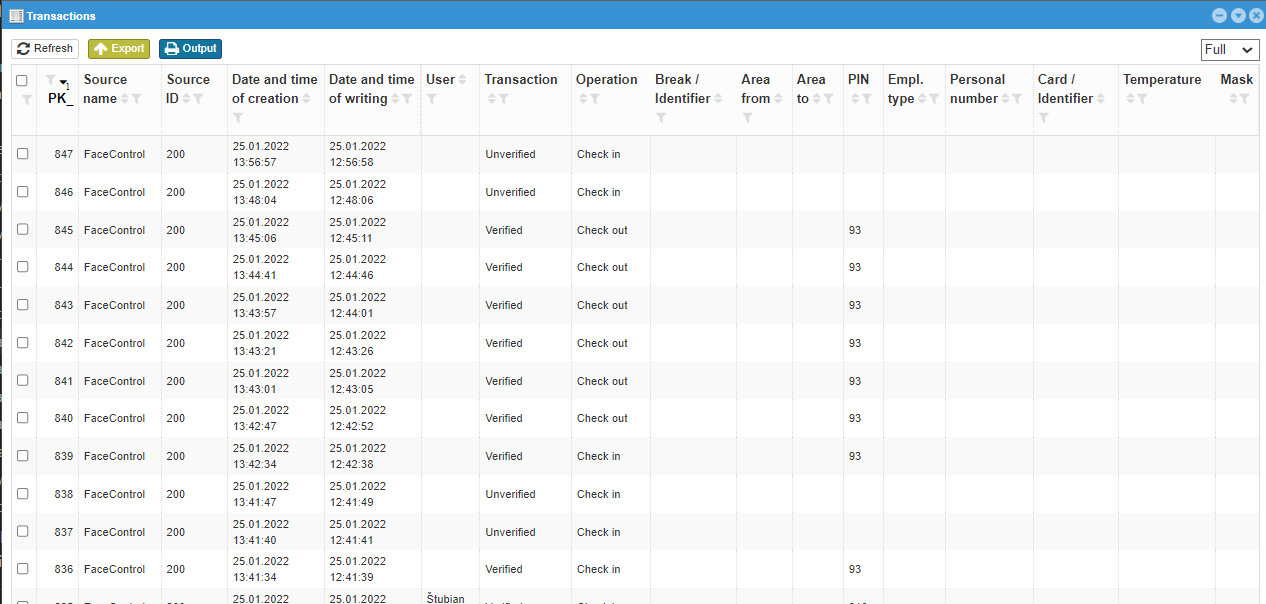 |
|---|
# Full vs Basic
| Column name | Full | Basic | Filter | Explanation |
|---|---|---|---|---|
| PK_ | ☑ | ☑ | Fill in | Transaction number |
| Source name | ☑ | ☑ | Fill in | The reader name in which the transaction was created |
| Source ID | ☑ | ☑ | Fill in | The reader number in which the transaction was created |
| Date and time of creation | ☑ | ☑ | Fill in the whole | Date and time in which the transaction occurred |
| Date and time of writing | ☑ | ☒ | Fill in the whole | The date and time the transaction was received on the server |
| User | ☑ | ☑ | Choose from options | User name |
| Transaction | ☑ | ☑ | Choose from options | Transaction type |
| Operation | ☑ | ☑ | Choose from options | Type of operation |
| Break / Identifier | ☑ | ☑ | Choose from options | Break number and name, if specified |
| Area from | ☑ | ☒ | Choose from options | The area from which the user passed the reader |
| Area to | ☑ | ☒ | Choose from options | The area into which the user passed the reader |
| PIN | ☑ | ☑ | Fill in | User number in webPatrol |
| Employment type | ☑ | ☑ | Choose from options |  Type of employment of the employee Type of employment of the employee |
| Personal number | ☑ | ☑ | Fill in | Personal number of the employee in the system |
| Card / Identifier | ☑ | ☑ | Fill in | Card / identifier number |
| Temperature | ☑ | ☒ | Fill in | Value |
| Mask | ☑ | ☒ | Choose from options | The verified person was / was not wearing a mask |
# Filter - choose from options
User- is selected according to users registered in webPatrolBreak / Identifier- is selected according to the settings BreaksArea fromandArea to- is selected according to the settings AreasEmployment type- is selected from Types of employmentMask- He had / He didn't
Warning
At the bottom of the window, it is possible to set how many results can be seen in one window, I do not recommend using the All option in this case, as the number of transactions can be in the tens of thousands. In such a case, it may happen that not all of them can be loaded and it will only take you a long time to wait for the result.
# Transaction
Many options from the transaction type are minimally used, or a reader must be set to use them.
A selection of filters for transactions includes (the most important/most used have a higher priority in the order):
Unverified - card- osoba sa snažila overiť kartou, no táto karta nie je zapísaná medzi vzorkami v snímačiUnverified- osoba sa snažila overiť, ale nebola rozpoznanáVerified but access denied - other reasonsVerified- užívateľ bol overenýUnknownVerified but access denied - time zone- užívateľ bol overený, no podľa jeho oprávnení v tejto časovej zóne nemá prístupVerified - Passing out- verified on clock out from areasOverený - Passing in- verified upon clock in into one of areasNUnknown transactionTurning on the readerTurning off the readerAuthentication failedAlarmEntering the menuChanging settingsTemplate backupPassword addedRegistered HID cardDeleting a userDeleting a templateDeleting of passwordDeleting the RF cardDeleted dataCreated MF cardEntered MF cardRegistered MF cardDeleting the MF cardDeleting the contents of the MF cardCopying data to the cardCopying data from the card to the readerSetting the date and timeRestoring factory settings of the readerDeleting the attendance recordDeleting administrator rightsChecking access settingsChecking of user access settingsChecking of time zoneChecking of unlockUnlocking the readerAdding a userChanging the parameters of the printPressure alarmIdentity not confirmedAnti-pass backCreation of an attendance recordFingerprint verificationAdding a userCreating a templatePressing the buttonUnlocking the readerSystem startupVerificationGenerating a template from a printAlarmRF card numberCard write-up OKRemoving the card OKEMDataConnectionDisconnectionDoorsDeleting a templateAttendance transactionCreating a templateAlarm - False alarmAlarm - Door readerAlarm - ButtonAlarm - TamperAlarm - switched offPressure alarm - ButtonPressure alarm - Verification errorVerification error - PasswordVerification error - FingerVerification error - ID cardVerification error - PINVerification error - Mifare cardVerification error - iClass cardDoor - Door open for a long time!Door - Opening with an electric lockDoor - Door is closedDoor - Door was forced open- And many others
# Operation
The transaction may talk about verification, but at the same time it sends the information needed to webVisitor or webApetit, so there are still operations.
-Clock inClock outOrder foodCancel foodFood into bourseSelect food from bourseDispense of foodFood - verifiedClock in from lunchChange of companyChange of employment typePatrolClock out for lunchClock in from breakClock out for breakBalanceStart of taskEnd of task